Description
Please download UCCNC Software from the CNCdrive website here. After successfully installing and testing the software, A software license can be purchased through Maker Store.
The UCCNC is a machine control software. It uses and external hardware to generate signals to produce coordinated motion on up to 6 machine axis.
This software connects to the external motion controller via a single USB port connection or ethernet connection (depends on the motion controller model) of a personal computer (PC) and via a software application interface (API) which is built into the software. The installer of the UCCNC software includes and completes all the tasks to make it possible to use this software on your computer. The device drivers are included in the installer too.
Key features:
- Supports the UC100, UC300, UC300ETH, UC400ETH and AXBB-E motion controllers.
- Controls machines up to 6-axis.
- Executes RS274 G and M codes.
- Unlimited number of user text macros with flexible script engine.
- Up to 400kHz operation. (selectable 25kHz, 50kHz, 100kHz, 200kHz, 400kHz with 20us, 10us, 5us, 2.5us and 1.25us pulse widths.) Note: Maximum step frequency depends on the motion controller device used.
- Exact stop and constant velocity interpolations with highly configurable advanced look ahead function.
- G54..G59 work offsets and G52/G92 temporary offset.
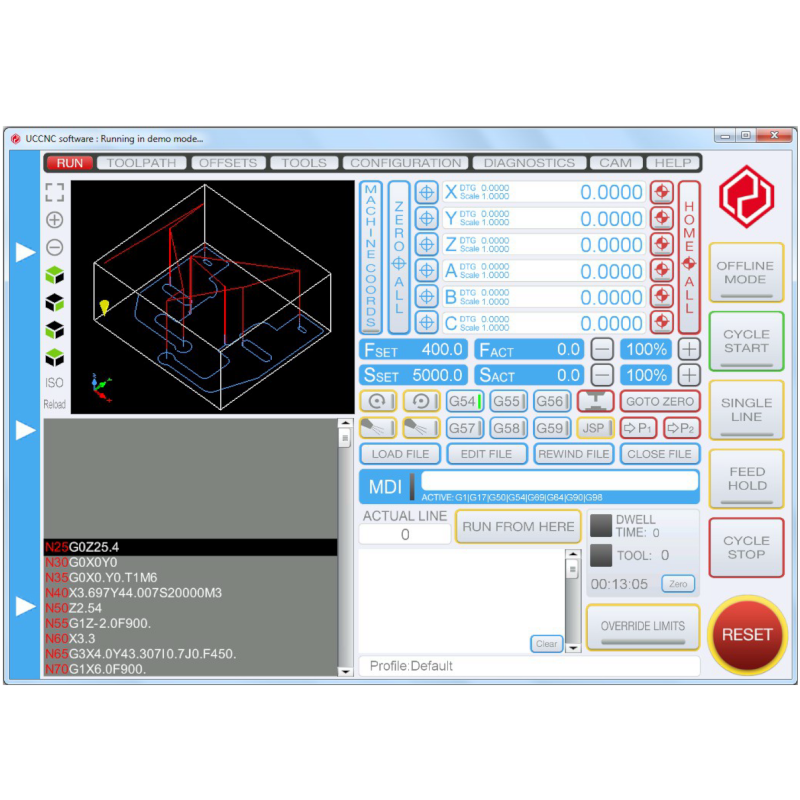
- Realtime 3D toolpath viewer.
- OpenGL screen optimised for fast screen update rates with low CPU/GPU usage.
- Built in visual screen editor which allows the screen to be fully customised by the end-user.
- 48 configurable hotkeys.
- 48 configurable inputs trigger to assign physical input pins to UCCNC function calls.
- 48 configurable outputs trigger to assign virtual LEDs to physical output pins.
- Parametric programming using internal variables and programming mathematical expressions.
- Controls THC control for plasma cutters. (M205 and M206 macros)
- Screen sets for mills/routers and plasma cutters.
- Modbus TCP, RTU and ASCII communication support via Modbus plugin.
- M10/M11 macros for fast synchronous outputs for laser cutting applications.
- G33 and G76 synchronous thread cutting with free running spindle and encoder feedback to the motion controller.
- G33.1 and G33.2 rigid tapping with Z-axis synchronised to spindle motor.
- Supports wired MPGs and the UCR200, UCR201, XHC HB04 and other 3rd party wireless pendants via plugin.
- Built in basic CAM module with DXF files import. (limited functionality!)
- Stopless smooth backlash compensation with adjustable backlash acceleration.
- Plugin interface with Visual C# example plugin template. Plugin works with C#, VB, C++ programming languages.
- Fast laser scan type engraving plugin, web camera plugin, Xbox360 controller plugin, 3D printer plugin etc..
- Fast communication with optimised buffering technic producing low button press to event execution time.
- Extremely low jitter on the step and direction signals for smooth, high speed and precise motors operation.
- Runs in demo (simulation mode) without a software license key.
- Being continuously and actively developed and maintained.
- Supported on our forum and via e-mail by dedicated support team.
- Compatible OP systems: Windows XP, 7, 8, 8.1,10 on all both 32 and 64bit versions.
Please note: The UCCNC software is licensed per motion controller. One license key works with one motion controller only. The license keys are tied to the serial numbers of the motion controllers and are not tied to the computer in any ways which means that the license keys can be installed on any number of computers. We require your compatible controller’s serial number to submit the license. Please add this in a note on your order.
Video Tutorials:
- UCCNC software installation video
- UCCNC setup with Mach3 .xml profile import
- UCCNC software toolpath demonstration
- Creating a basic toolpath with VCarvePRO and exporting the code to the UCCNC software
Other Resources:
- UCCNC manual
- UCCNC software installer (official release)
- Software pre-requirements (required for XP only)
PLEASE NOTE:
Software Fulfillment: These licenses are manually applied and issued by our staff during business hours. Allow up to 3 business days to receive your license.
Inquiries: For any questions or assistance, feel free to reach out to us through our Contact Us page.